
How ripeat works
This page is the map of the whole application: the pieces, what happens when you run a command, where files live, and who gets to say yes. Each piece links to the page that covers it in detail.
The idea in one paragraph
You keep a list of tools you want. ripeat looks each name up in its recipes (the "how" for each system), turns the list into an ordered plan, rates the risk of that plan with plain rules, shows you both, and asks. Only then does it change the machine, writing a journal first, so any run can be undone where possible. The plan, the rating and the lookups use fixed rules. An AI assistant can prepare and explain a plan; if you enable the optional run tools, it can also request an install or rollback for you to confirm.
The pipeline
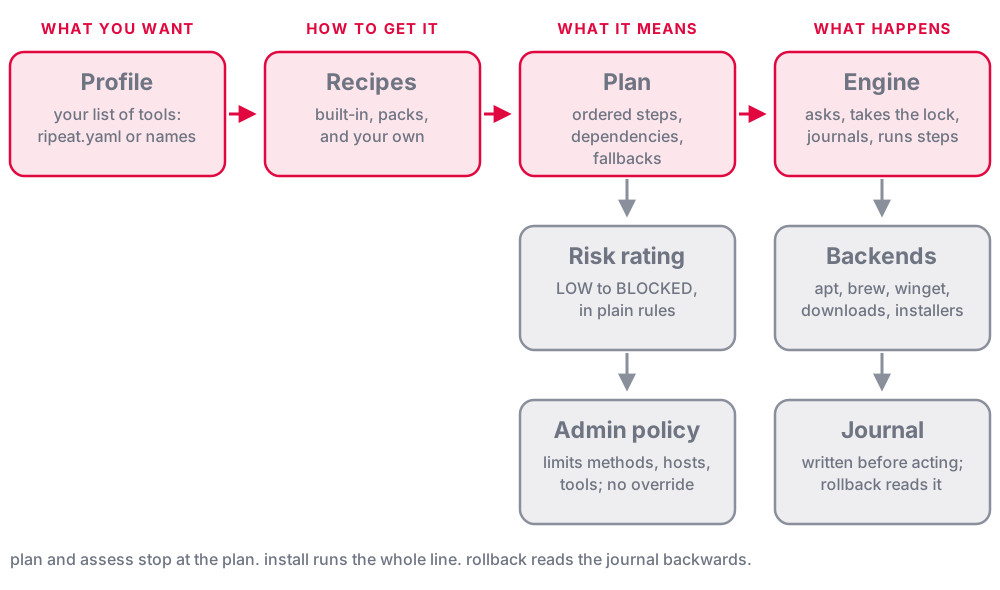
Every command is some part of this line. plan and assess stop before the engine; install goes all the way; rollback reads the journal backwards.
The pieces
| Piece | What it is | Read more |
|---|---|---|
| Profile | The list of tools you want: ripeat.yaml, or a saved one by name. Says what, never how | Profiles: your list |
| Recipe | How one tool is installed on each OS: a package manager, a checked download, a vendor installer. Several options per OS, first usable wins | Recipes |
| Recipe layers | Built-in recipes, then recipes from added packs, then your own. A higher layer wins, and a pack can never replace a built-in one | Recipe packs (taps) |
| Plan | The recipes resolved for this machine: dependencies first, the method chosen, what is already there | Install, uninstall, rollback |
| Risk rating | LOW, MEDIUM, HIGH or BLOCKED from plain rules (admin rights, a download, a shell command, whether you wrote the recipe). Written reasons, no AI | Risk and assess |
| Backends | One adapter per way of installing: apt, dnf, pacman, snap, flatpak, brew, winget, scoop, choco, downloads, installers. The only code that touches the system | Recipes |
| Engine | Runs a plan: asks, takes the lock, journals, installs step by step, undoes a failed run | Install, uninstall, rollback |
| State and journal | What ripeat installed, and a record of every run, written before acting | Install, uninstall, rollback |
| Lockfile | ripeat.lock: the exact versions installed, to reproduce them | The lockfile |
| Administrator policy | A file only an administrator can write, that limits methods, download hosts, tools and more, whatever anyone asks | Administrator policy |
| Account policy | Users, groups and admin rights as a file, applied only when you say so | Users and groups |
| Lookups | find and add: where a tool can come from (package managers, GitHub), drafted into an ordinary recipe you approve | Install by name |
| MCP server | ripeat mcp: lets an AI assistant look things up, plan, rate and prepare drafts. Plan-only by default | ripeat as an MCP server, Drafts from an assistant |
What ripeat install git node does
- Loads the recipes (built-in, packs, yours) and the administrator policy. A policy that exists but cannot be read stops the run: it never fails open.
- Resolves the plan. Dependencies come first (
typescriptneedsnode). For each tool, the first install option that suits this machine and this policy is chosen. A name with no recipe, at a keyboard, is looked up and offered to you to add. - Applies
ripeat.lockif there is one, and runs the pre-flight checks (is the method available, does the policy allow it). - Shows the plan and the risk, with the reasons.
planand--dry-runstop here. - Asks. A HIGH-risk plan needs its own explicit yes. Then, if a step needs administrator rights, it asks for them once, up front.
- Takes the lock and writes the journal entry for the run before anything changes.
- Runs each step. A tool ripeat already manages is skipped; a tool already on the machine is recorded and left alone; anything else is installed through its backend and recorded as it goes.
- If a step fails, ripeat says why it probably failed and attempts to undo the run, newest step first. It reports anything it could not undo;
--no-rollbackdisables automatic rollback. If a step needs a restart, the run pauses andripeat resumecarries on. - Finishes with the run marked complete.
ripeat rollbackcan undo it later.
Where ripeat keeps its files
Everything is under one folder, $RIPEAT_HOME (default: ~/Library/Application Support/ripeat on macOS, ~/.config/ripeat on Linux, %AppData%\ripeat on Windows). Your lists and policy files (ripeat.yaml, ripeat.lock, ripeat.policy.yaml) live in the folder you run ripeat from. The full table is in Getting started. The administrator policy lives in a system folder only an administrator can write (Administrator policy).
Who says yes
| Decision | Who answers |
|---|---|
| Install, uninstall, upgrade, rollback | You, at a question (--yes answers it, for scripts) |
| A HIGH-risk plan | You, separately (--yes does not cover it; --accept-risk does) |
Save a recipe found by find or add | You, after reading it |
| Add or update a recipe pack | You, at a terminal. There is no --yes |
| Approve a recipe an assistant prepared | You, at a terminal. There is no --yes |
Let an assistant install (--allow-run) | You turn it on; then you confirm every run in your own app |
| What may never happen on this machine | The administrator's policy, which nothing overrides |
The guarantees
- Install runs show a plan and ask before acting.
--yesanswers the ordinary confirmation for scripts; HIGH-risk plans have a separate gate. Looking is free:plan,assess,find,list,validateandrecipes checkchange nothing. - ripeat never removes what it did not install. A tool that was on the machine first is recorded as such, and left alone by
uninstallandrollback. - Every run is journaled before it acts, so a crash or a failure can be rolled back from the journal. Rollback is best effort and reports anything it cannot undo.
- One writer at a time. A second ripeat that would change things stops at once and says so.
- Downloads are verified. A downloaded program or installer must match a SHA-256. A vendor installer must also carry a valid signature unless its recipe explicitly allows an unsigned file, which is rated HIGH.
- Plans and risk ratings use fixed rules. An assistant can request and explain them, and with the optional run tools can request a confirmed install or rollback.
Where to go next
- Start with Getting started and Profiles: your list.
- To understand a plan before you run it: Risk and
assessand Install, uninstall, rollback. - To use it from an AI assistant: ripeat as an MCP server.
- To use it across a team: Recipe packs (taps), Administrator policy and Admin rights.
- To see what has been tested on which system: What has been verified.